Hi, my order arrived without the charger, can you
Sneak peek · not sent yetSneak peek
Read the question before it’s sent
Agents see what a visitor is typing as they type it, so the answer is ready the moment they hit send.
Engage website visitors, answer questions faster, and convert more leads with an all-in-one helpdesk designed to make customer support effortless.
Set up in about two minutes. One line of code on your site.
IncludedWebsite heatmaps & rage-click detection · see where visitors click, read and get stuck→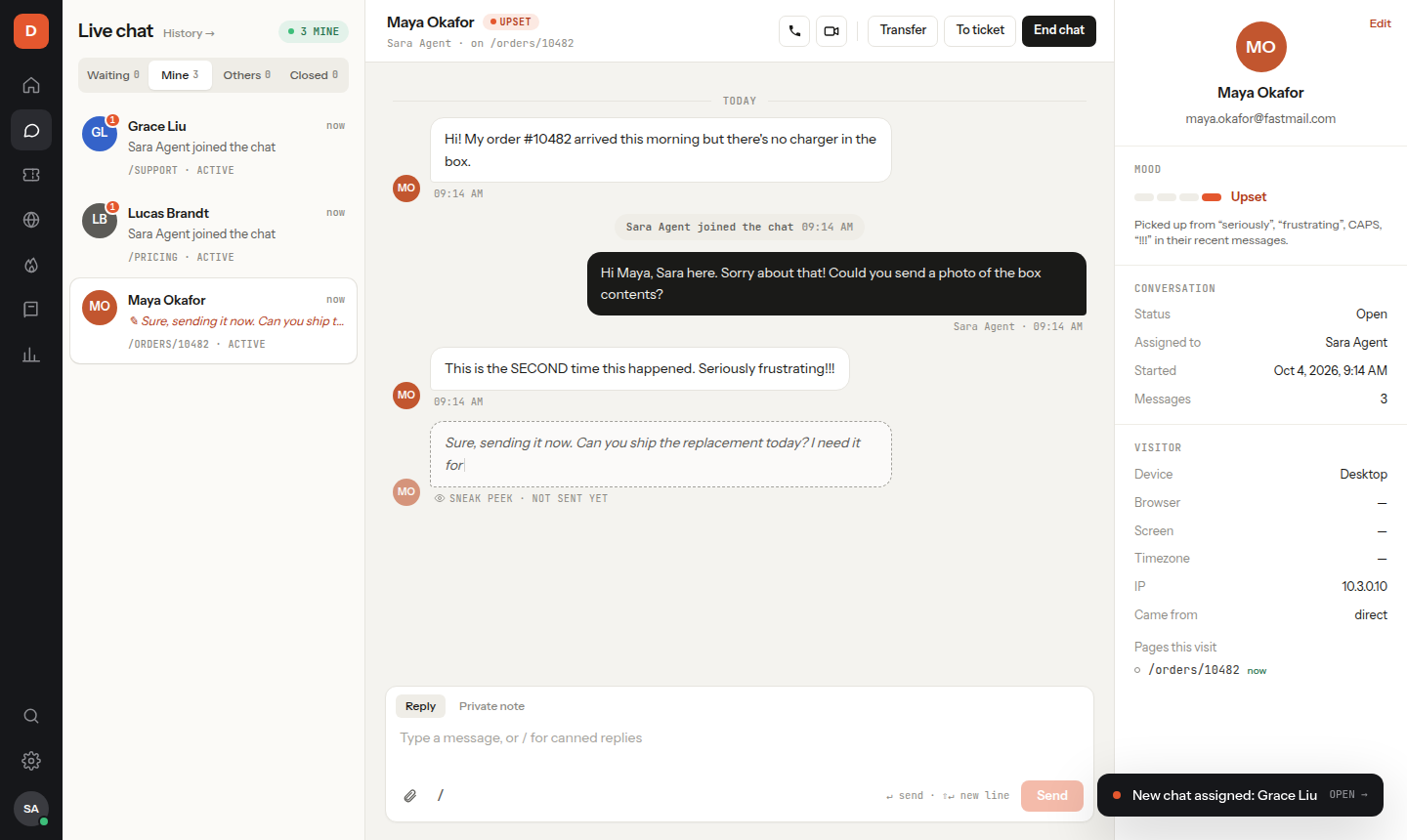
Agents see what a visitor is typing as they type it, so the answer is ready the moment they hit send.
Picked up from “seriously”, “frustrating”, CAPS, “!!!”.
Every chat is marked Happy, Calm, Tense or Upset from the visitor’s words, and it shows you exactly which words moved it.
When a visitor asks something you have answered before, the matching saved reply appears above the message box.
Waiting chats count up and turn from green to amber to red, and chats you owe a reply are flagged in the list.
Customers write wherever they like. Your agents answer every message from the same place, and an AI assistant can cover nights and weekends.
How the shared inbox works →Messages, photos and voice notes from Meta's apps arrive next to your website chats.
Answers from your Help Center articles, day and night, and passes the chat to a person when needed.
Visitors record a voice note in the chat. Agents read the text, and the AI answers it.
Someone clicking the same button again and again? The chat opens and offers help.
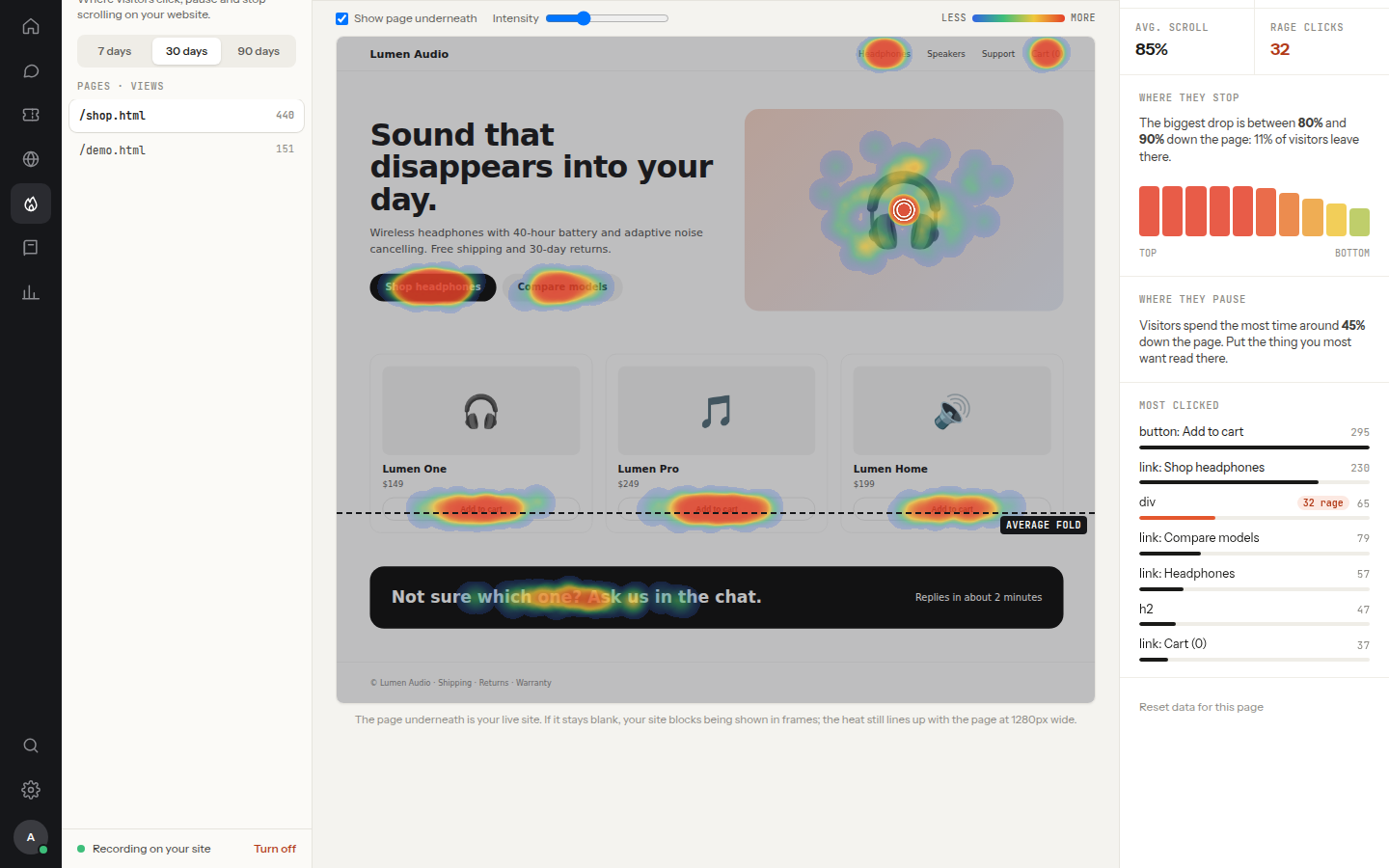
The same script that shows your chat button also maps how people use each page. No second tool, no extra code.
Never keystrokes or form contents. Respects Do Not Track.
One line of code. Your colours, your greeting, pre-chat form and automatic invitations.
Every channel in the same shared inbox, answered by the whole team.
Answers visitors 24/7 from your Help Center and hands over to a person when it should.
Visitors record voice notes, written out for you. Start a call with screen sharing.
Email, web form and chat in one queue with SLAs and automations, plus a knowledge base.
See where visitors click and leave, and offer help the moment something frustrates them.
<!-- before </body> -->
<script src="https://chat.techsntechnology.com/widget.js"
        data-key="wk_your_code" async></script>
Works with WordPress, Shopify, Wix, Webflow and any HTML site.
Packages differ only by team size. Every feature is in every package.
For one person answering their own customers.
For a small team sharing the inbox.
For a support team working across shifts.
For larger teams with departments, rules and many agents.
Yes. The Free package is free forever for one agent, with every feature, and sign-up never asks for a card. Basic and Premium add more agents when your team grows.
Create a workspace, copy the one-line snippet from Chat widget → Install, and paste it before </body> on your site. It works on any site that lets you add a script tag, including WordPress, Shopify, Wix and plain HTML.
Yes. Connect your Meta app under Channels and those messages arrive in the same inbox as your website chats, where any agent or the AI assistant can reply.
Yes. The AI assistant answers visitors from your published Help Center articles and hands the chat to your team when it should. Use your own API key from Claude, ChatGPT (OpenAI), Google Gemini, DeepSeek, Grok, Mistral and more.
Yes. Add agents and admins, group them into departments, transfer chats between them and let new chats go to whoever is free. How many agents you can add depends on the package.
Yes. Every workspace has its own agents, customers, chats, tickets and Help Center, and no other company can see them.
Yes. Emails, web forms and chats become tickets in one queue, with assignment, priorities, SLAs, triggers, automations and macros. A chat can be turned into a ticket with one click.
Not to us. You connect your own API key from Claude, ChatGPT, Gemini or another provider (or hundreds of models through OpenRouter) and pay that provider directly for what you use, so you control the cost.
See it before they hit send. Start free today.
Create your free workspace